Step-by-step Linux commands for bug bounty live hunting

Recursive Subdomain Enumeration🔍🔍
subfinder -d domain.com -all -recursive > subs_domain.com.txt
-d domain.com: Specifies the target domain.-all: Uses all available sources for subdomain discovery. Subfinder integrates with multiple data sources such as ThreatCrowd, VirusTotal, Censys, etc., and using-allensures you’re casting a wide net.-recursive: Allows recursive subdomain discovery. This digs deeper into subdomains and checks for more subdomains within the already found subdomains.
Filtering live hosts with httpx🚨
cat subs_domain.com.txt | httpx -td -title -sc -ip > httpx_domain.com.txt
cat httpx_domain.com.txt | awk '{print $1}' > live_subs_domain.com.txt
-td: Technology Detection-title: Extracts the HTML<title>from the response for each subdomain. This is useful for identifying what services might be running on each host.-sc: Prints the HTTP status code, making it easy to spot potential points of interest like 200 (OK) or 403 (Forbidden).-ip: Displays the IP address for each subdomain.
Port Subs
subfinder -d domain.com -all -recursive > subs_domain.com.txt
cat subs_domain.com.txt | httpx -silent -ports 80,443,3000,8080,8000,8081,8008,8888,8443,9000,9001,9090 | tee -a alive_subs_port.txt
Nuclei Automated Live Subdomains Spray (with rate limit)🔨
nuclei -l live_subs_domain.com.txt -rl 10 -bs 2 -c 2 -as -silent -s critical,high,medium
-l live_subs_domain.com.txt: Specifies the input file containing the live subdomains.-rl 10: Limits the rate of requests to 10 per second. This is essential to avoid overwhelming the target server, which could lead to rate-limiting or even being blocked.-bs 2: maximum number of hosts to be analyzed in parallel per template(default is 25)-c 2: maximum number of templates to be executed in parallel (default is 25)-as: Automatic web scan using wappalyzer technology detection to tags mapping-silent: Removes extra output from the terminal, leaving only critical information.-s critical,high,medium: Tells Nuclei to scan only for critical, high, and medium severity vulnerabilities, which helps you focus on the most important findings
These nuclei options are important as it helps to rate limit the number of requests thrown to the server at every second, which will help upto some extent to prevent from getting blocked easily and unresponsive target skipped problems of nuclei.
Dynamic Application Security Testing (-dast)
nuclei -l waymore_domain.com.txt -rl 20 -bs 2 -c 2 -silent -s critical,high,medium -dast
Javascript Files Analysis
cat waymore_domain.com.txt | grep '.js' | httpx -mc 200 >> js.txt
nuclei -l js.txt -t /home/kali/.local/nuclei-templates/http/exposures -o potential_secrets.txt
Finding WAF (web application firewall)👮♂️
cat httpx_domain.com.txt | grep 403
One quick way to identify the presence of Web Application Firewalls (WAFs) is to look for subdomains returning a 403 Forbidden status code. WAFs are often configured to block unauthorized access, and spotting multiple 403 responses can indicate that a WAF is protecting the target.
Some of the common WAFs used by reputed companies are
Amazon Cloudfront
Cloudflare
Imperva
Akamai kona site defender
F5 Advanced WAF
Barracuda Web Application Firewall
Fortinet FortiWeb
Microsoft Azure Web Application Firewall
Radware AppWall
Sucuri WAF
Subdomains without WAF✅
After identifying live subdomains and their corresponding WAFs, the next step is to filter out subdomains that aren’t protected by a Web Application Firewall (WAF). This helps focus on potentially weaker targets.
cat httpx_domain.com.txt | grep -v -i -E 'cloudfront|imperva|cloudflare' > nowaf_subs_domain.com.txt
Visit All Non-WAF Subdomains Manually
Next, you can visit these subdomains manually to look for interesting responses. For example, a 403 Forbidden response may suggest the existence of restricted areas or resources that could be valuable to investigate further. In some cases, you might encounter endpoints where you have a strong suspicion of what could be hidden behind the restriction, making them prime targets for deeper exploration
cat nowaf_subs_domain.com.txt | grep 403 | awk '{print $1}'
To streamline this process, I recommend using a browser extension like Open Multiple URLs, which lets you open several subdomains simultaneously in different tabs for quicker manual investigation.
Prepare the List of 403 Subdomains for Fuzzing
Once you’ve identified subdomains returning a 403 Forbidden response, prepare them for further fuzzing. Fuzzing can help uncover hidden files, directories, or misconfigurations.
cat nowaf_subs_domain.com.txt | grep 403 | awk '{print $1}' > 403_subs_domain.com.txt
403 Fuzzing🔍
When you encounter a 403 Forbidden response, it usually means that access to a specific resource or endpoint is restricted. While it might seem like a dead end at first, this restriction can actually signal that valuable information is being protected—whether it’s sensitive files, hidden directories, or misconfigured security rules.Here’s why fuzzing these 403 Forbidden subdomains is crucial.
Default Wordlist Fuzzing
dirsearch -u https://sub.domain.com -x 403,404,500,400,502,503,429 --random-agent
Extension based Fuzzing
dirsearch -u https://sub.domain.com -e xml,json,sql,db,log,yml,yaml,bak,txt,tar.gz,zip -x 403,404,500,400,502,503,429 --random-agent
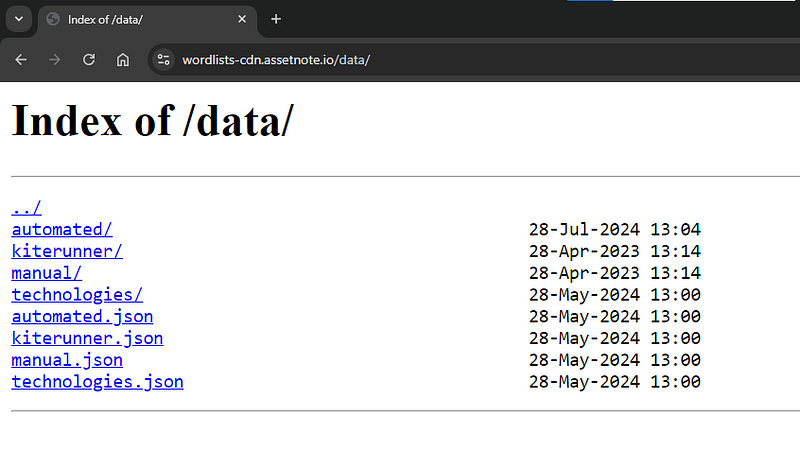
One of the good wordlists resource is below.
Index of /data/
automated/ 28-Jul-2024 13:04 – kiterunner/ 28-Apr-2023 13:14 – manual/ 28-Apr-2023 13:14 – technologies/ 28-May-2024…wordlists-cdn.assetnote.io
Finding Public Exploits💣
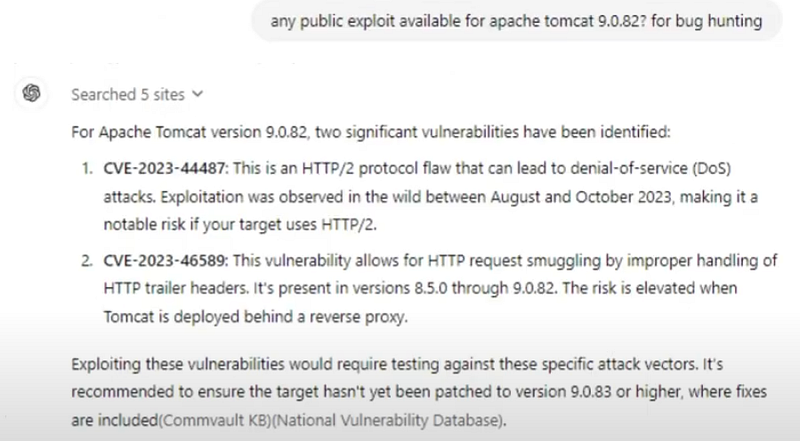
After identifying potential vulnerabilities in a specific subdomain, the next step is to search for public exploits that could be leveraged. For example, if you discover a vulnerable version of Apache Tomcat, use Google dorks to search for exploit proof-of-concept (PoC) scripts:
apache tomcat 9.0.82 exploit poc site:github.com
Chatgpt exploit assistance🤖
Finding Appropriate Wordlists📗
When fuzzing specific services like Apache Tomcat, using targeted wordlists can significantly improve your chances of finding hidden vulnerabilities. You can search for wordlists specific to the server you’re targeting, such as Apache Tomcat, with the following commands:
sudo apt install seclists
cd /usr/share/seclists/Discovery/Web-Content
ls | grep -i apache
To see how many entries are in a specific wordlist, run:
cat ApacheTomcat.fuzz.txt | wc -l
Apache Tomcat Fuzzing🐱
Once you’ve found the appropriate wordlist, use it to fuzz the Apache Tomcat server for hidden files, misconfigurations, or vulnerable endpoints:
dirsearch -u https://sub2.sub1.domain.com -x 403,404,500,400,502,503,429 -w /usr/share/seclists/Discovery/Web-Content/ApacheTomcat.fuzz.txt
Extension Based Fuzzing
Fuzzing for different file extensions can help uncover sensitive files like backups, configuration files, or database dumps. Use dirsearch for this purpose as well:
dirsearch -u https://sub2.sub1.domain.com -x 403,404,500,400,502,503,429 -e xml,json,sql,db,log,yml,yaml,bak,txt,tar.gz,zip -w /usr/share/seclists/Discovery/Web-Content/ApacheTomcat.fuzz.txt
Finding Hidden Database Files💎
Another valuable source of information is hidden database files. You can search for wordlists that specifically target database file extensions using Google dorks or community-sourced wordlists.
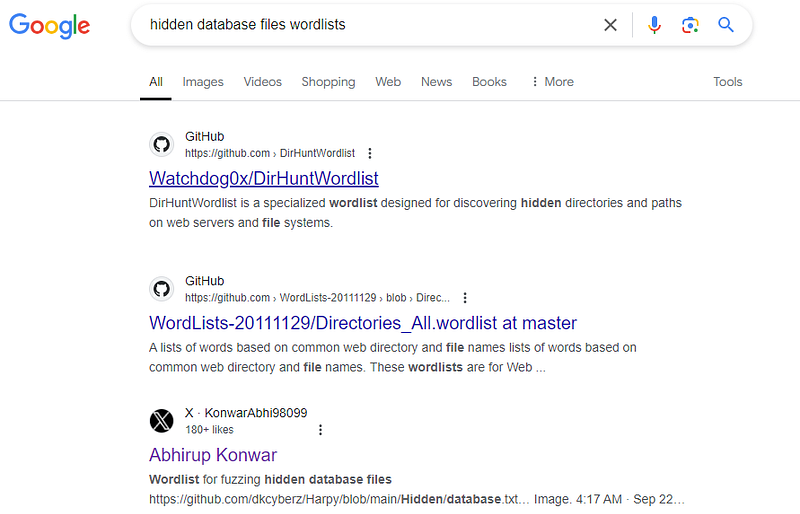
mkdir db_wordlists
cd db_wordlists
wget https://raw.githubusercontent.com/dkcyberz/Harpy/refs/heads/main/Hidden/database.txt
dirsearch -u https://sub2.sub1.domain.com -x 403,404,500,400,502,503,429 -e xml,json,sql,db,log,yml,yaml,bak,txt,tar.gz,zip -w /path/to/wordlists/database.txt
Extract Archived URLs🔗
waymore -i domain.com -mode U -oU waymore_domain.com.txt
waymoreis used to gather archived URLs from sources like Wayback Machine(web.archive.org) , common crawl(index.commoncrawl.org), alien vault OTX(otx.alienvault.com), URLScan (urlscan.io), virus total(virustotal.com)-i domain.comspecifiesdomain.comas the target domain.-mode Uretrieve URLs only without downloading response-oU waymore_domain.com.txtsaves the unique URLs to output filewaymore_domain.com.txt
If waymore is functioning properly, there is no need to run the following command.
waybackurls domain.com > wayback_domain.com.txt
Archive DeepHunt📦
Below is a mini helper script that I use to refine the URLs and assist in my manual URL analysis.
import os
from colorama import Fore, Style, init

# Initialize colorama for Windows support
init(autoreset=True)

def display_banner():
    # ASCII art in purple
    banner = r"""
     _                          _       __
    /.\      _ ___    ____     FJ___    LJ  _    _   ____
   //_\\    J '__ ", F ___J.  J  __ `.     J |  | L F __ J
  / ___ \   | |__|-J| |---LJ  | |--| |  FJ J J  F L| _____J
 / L___J \  F L  `-'F L___--. F L  J J J  LJ\ \/ /FF L___--.
J__L   J__LJ__L    J\______/FJ__L  J__LJ__L \\__//J\______/F
|__L   J__||__L     J______F |__L  J__||__|  \__/  J______F
   ___                                    _  _                         _
  F __".    ____      ____     _ ___     FJ  L]    _    _    _ ___    FJ_
 J |--\ L  F __ J    F __ J   J '__ J   J |__| L  J |  | L  J '__ J  J  _|
 | |  J | | _____J  | _____J  | |--| |  |  __  |  | |  | |  | |__| | | |-'
 F L__J | F L___--. F L___--. F L__J J  F L__J J  F L__J J  F L  J J F |__-.
J______/FJ\______/FJ\______/FJ  _____/LJ__L  J__LJ\____,__LJ__L  J__L\_____
|______F  J______F  J______F |_J_____F |__L  J__| J____,__F|__L  J__|J_____F
                             L_J
    """
    # Print the banner in purple
    print(Fore.MAGENTA + banner)
    # Print the "Script by LegionHunter" in green
    print(Fore.GREEN + "Script by LegionHunter\n" + Style.RESET_ALL)

def get_unique_extensions(filename):
    extensions = set()  # Use a set to avoid duplicates
    with open(filename, 'r') as file:
        for line in file:
            # Strip the line of any whitespace characters
            url = line.strip()
            # Split URL into path and get the extension if present
            path = os.path.splitext(url)[1]
            if path:  # Add non-empty extensions
                extensions.add(path)

    # Print the unique extensions found
    print("Unique Extensions:")
    for ext in sorted(extensions):
        print(ext)

# Display banner
display_banner()

# Example usage
filename = input("Enter the filename of waybackurls output: ")
get_unique_extensions(filename)
JUICY PATTERN FINDING🤑
Below regexes tries to declutter stuff, doesn’t imply it’s 100% accurate.
UUID🆔
A UUID (Universally Unique Identifier) is a 128-bit unique identifier used for resources like user accounts or records. Extracting UUIDs during bug hunting helps identify sensitive resources, which can lead to vulnerabilities like IDOR (Insecure Direct Object Reference) or access control flaws. Finding UUIDs can also expose hidden or deprecated endpoints for further analysis.
grep -Eo '[0-9a-fA-F]{8}-[0-9a-fA-F]{4}-[1-5][0-9a-fA-F]{3}-[89abAB][0-9a-fA-F]{3}-[0-9a-fA-F]{12}' wayback_domain.com.txt | sort -u
💡 When some companies don’t accept IDOR bugs based on UUID as it isn’t feasible to brute force, we simply extract via waybackurls or waymore(best)
JWT (Json Web Token)💰
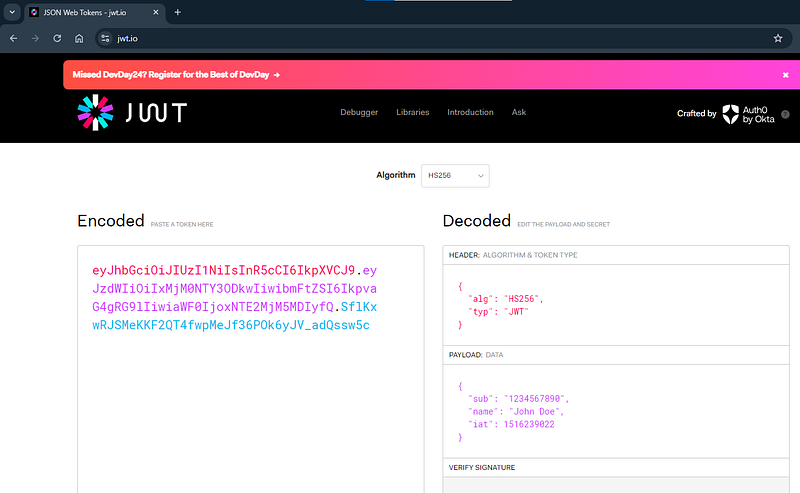
A JWT (JSON Web Token) is a compact, URL-safe token that represents claims transferred between two parties, consisting of a header, payload, and signature. Extracting JWT tokens in bug hunting is vital because they often contain sensitive information about user identities and permissions, which can lead to potential unauthorized access. Additionally, JWTs may contain excessive information that can be exploited, such as user roles or scopes, allowing attackers to manipulate claims and escalate privileges. Analyzing JWTs can also expose weaknesses in session handling, making them a critical target in security assessments.
cat wayback_domain.com.txt | grep "eyJ"
jwt.io
Any suspicious keyword/path/number👻
grep -Eo '([a-zA-Z0-9_-]{20,})' wayback_domain.com.txt
SSN (Social Security Number)🔢
grep -Eo '\b[0-9]{3}-[0-9]{2}-[0-9]{4}\b' wayback_domain.com.txt
Credit Card Numbers💳
grep -Eo '\b[0-9]{13,16}\b' wayback_domain.com.txt
Potential SessionIDs and cookies
grep -Eo '[a-zA-Z0-9]{32,}' wayback_domain.com.txt
Tokens + Secrets
cat wayback_domain.com.txt | grep "token"
cat wayback_domain.com.txt | grep "token="
cat wayback_domain.com.txt | grep "code"
cat wayback_domain.com.txt | grep "code="
cat wayback_domain.com.txt | grep "secret"
cat wayback_domain.com.txt | grep "secret="
Others
cat wayback_domain.com.txt | grep "admin"
cat wayback_domain.com.txt | grep "pass"
cat wayback_domain.com.txt | grep "pwd"
cat wayback_domain.com.txt | grep "passwd"
cat wayback_domain.com.txt | grep "password"

cat wayback_domain.com.txt | grep "phone"
cat wayback_domain.com.txt | grep "mobile"
cat wayback_domain.com.txt | grep "number"

cat wayback_domain.com.txt | grep "mail"
Private IP Address🚨
Identifying private IP addresses is essential for uncovering hidden internal services that could be vulnerable to exploitation. It can reveal potential security misconfigurations that expose sensitive data or systems to unauthorized access. Furthermore, this information assists in mapping out the internal network.
grep -Eo '((10|172\.(1[6-9]|2[0-9]|3[0-1])|192\.168)\.[0-9]{1,3}\.[0-9]{1,3})' wayback_domain.com.txt
IPv4🟢
grep -Eo '([0-9]{1,3}\.){3}[0-9]{1,3}' wayback_domain.com.txt
IPv6🔴
grep -Eo '([0-9a-fA-F]{1,4}:){7}[0-9a-fA-F]{1,4}' wayback_domain.com.txt
Payment💸
grep "payment" wayback_domain.com.txt
grep "order" wayback_domain.com.txt
grep "orderid" wayback_domain.com.txt
grep "payid" wayback_domain.com.txt
grep "invoice" wayback_domain.com.txt
grep "pay" wayback_domain.com.txt
grep "receipt" wayback_domain.com.txt
Roles & Privileges
grep "role=" wayback_domain.com.txt
grep "privilege=" wayback_domain.com.txt
grep "=admin" wayback_domain.com.txt
API Endpoint👾
grep "/api/" wayback_domain.com.txt
grep "api." wayback_domain.com.txt
grep "api" wayback_domain.com.txt
grep "/graphql" wayback_domain.com.txt
grep "graphql" wayback_domain.com.txt


# when new API versions are released, developers forget to remove previous ones
# so we go back to previous versions and then exploit them first as more
# chance to get bug :)
grep "/v1/" wayback_domain.com.txt
grep "/v2/" wayback_domain.com.txt
grep "/v3/" wayback_domain.com.txt
grep "/v4/" wayback_domain.com.txt
grep "/v5/" wayback_domain.com.txt
Authentication & Authorization👮♂️
cat wayback_domain.com.txt | grep "sso"
cat wayback_domain.com.txt | grep "/sso"
cat wayback_domain.com.txt | grep "saml"
cat wayback_domain.com.txt | grep "/saml"
cat wayback_domain.com.txt | grep "oauth"
cat wayback_domain.com.txt | grep "/oauth"
cat wayback_domain.com.txt | grep "auth"
cat wayback_domain.com.txt | grep "/auth"
cat wayback_domain.com.txt | grep "callback"
cat wayback_domain.com.txt | grep "/callback"
Try to identify endpoints related to SSO, SAML, OAuth, and authentication because they are critical for managing user identities and access control.
These endpoints are often complex and can be misconfigured, leading to vulnerabilities such as unauthorized access or privilege escalation. Specifically, misconfigured SSO or OAuth providers can expose sensitive data and create open redirect vulnerabilities, allowing attackers to redirect users to malicious sites.
By examining these endpoints, bug hunters can identify and exploit these weaknesses, ensuring robust authentication and authorization mechanisms are implemented to enhance overall application security.
Juicy Regex by Tom Hudson (aka Tomnomnom) 👽
grep -iE '=[^&]+/' wayback_domain.com.txt
grep -aiE '\|https?://[a-z0-9\.-]+\.mil/' tinyurls.txt | grep -i =http
grep -aioE 'pass(d|ord)=[^&]+' tinyurls.txt | tail
👉 Passive-ish Recon Techniques by Tom Hudson
https://archive.org/search?query=subject:urlteam
Information Disclosure via exposed files📂
grep -Eo 'https?://[^ ]+\.(env|yaml|yml|json|xml|log|sql|ini|bak|conf|config|db|dbf|tar|gz|backup|swp|old|key|pem|crt|pfx|pdf|xlsx|xls|ppt|pptx)' wayback_domain.com.txt
Google Dork
site:domain.com ext:env OR ext:yaml OR ext:yml OR ext:json OR ext:xml OR ext:zip OR ext:log OR ext:sql OR ext:ini OR ext:bak OR ext:conf OR ext:config OR ext:db OR ext:dbf OR ext:tar OR ext:gz OR ext:backup OR ext:swp OR ext:old OR ext:key OR ext:pem OR ext:crt OR ext:pfx OR ext:pdf OR ext:xlsx OR ext:xls OR ext:ppt OR ext:pptx
Manually we need to crawl each file and observe for any sensitive information that is disclosed and where the document is marked as “CONFIDENTIAL” , “INTERNAL USE ONLY”, “HIGHLY CONFIDENTIAL”, “PRIVATE USE ONLY”, “NOT FOR PUBLIC RELEASE” , etc..
PRO TIP😎
Convert above english keywords to other languages